Nexus Peak Digital Logo
Nexus Peak Digital
Personal Brain OS
100% OFFLINE • YOUR DATA NEVER LEAVES YOUR PC

Replace six scattered productivity apps with one offline 3D command space.

Personal Brain OS puts your projects, daily tasks, habits, workouts, cashflow, reading logs, and focus sprints inside one fast Windows desktop app. Every file stays on your hard drive with zero monthly fees.

One-time payment • $49 Early Launch (Ends Dec 1, then $79) • 14-day guarantee
On mobile or Mac? Email yourself the Windows link (+ Mobile/Mac updates)
10 Domains
Interactive 3D Orbit
Zero Cloud
Saved On Your PC
EN / FR Parser
Works 100% Offline
Win 10 / 11
Up to 3 PCs Included
Live App Preview · 8s Loop
00:00 / 00:08
Interactive Workspace Preview & Stack Audit

Test how commands route offline and tally what your current apps cost.

Click a domain node on the left to inspect local command routing, then toggle the six separate apps you currently pay for on the right.

1. Interactive Mini-Orbit Preview Select Orbital Node
ORBITAL NODE 01 // DEEP WORK 100% Local File
Active Node Queue
3 priority blocks queued · Lock-In Clock armed (90m target)
Bento Tracker State
92% focus yield · 0s cloud lag
Bilingual EN / FR Command Example
"Start 90m architecture block & log recovery stretch"
-> Routed to Lock-In Clock + Body Anatomy Tracker (Local SQLite)
2. 6-App Subscription Calculator 6 separate apps

Toggle the standalone monthly subscriptions Personal Brain OS replaces:

Current Annual Bloat
$516/yr
Personal Brain OS
$49 once
Year 1 Retained: $467
84 tab switches/day -> 0
Replace All 6 Apps for $49
Real Software Views · Unedited Offline Captures

Four core modules operating inside one local database.

Every image below was captured directly from Personal Brain OS running locally on Windows. Click any view to inspect full 4K resolution.

Pillar 01

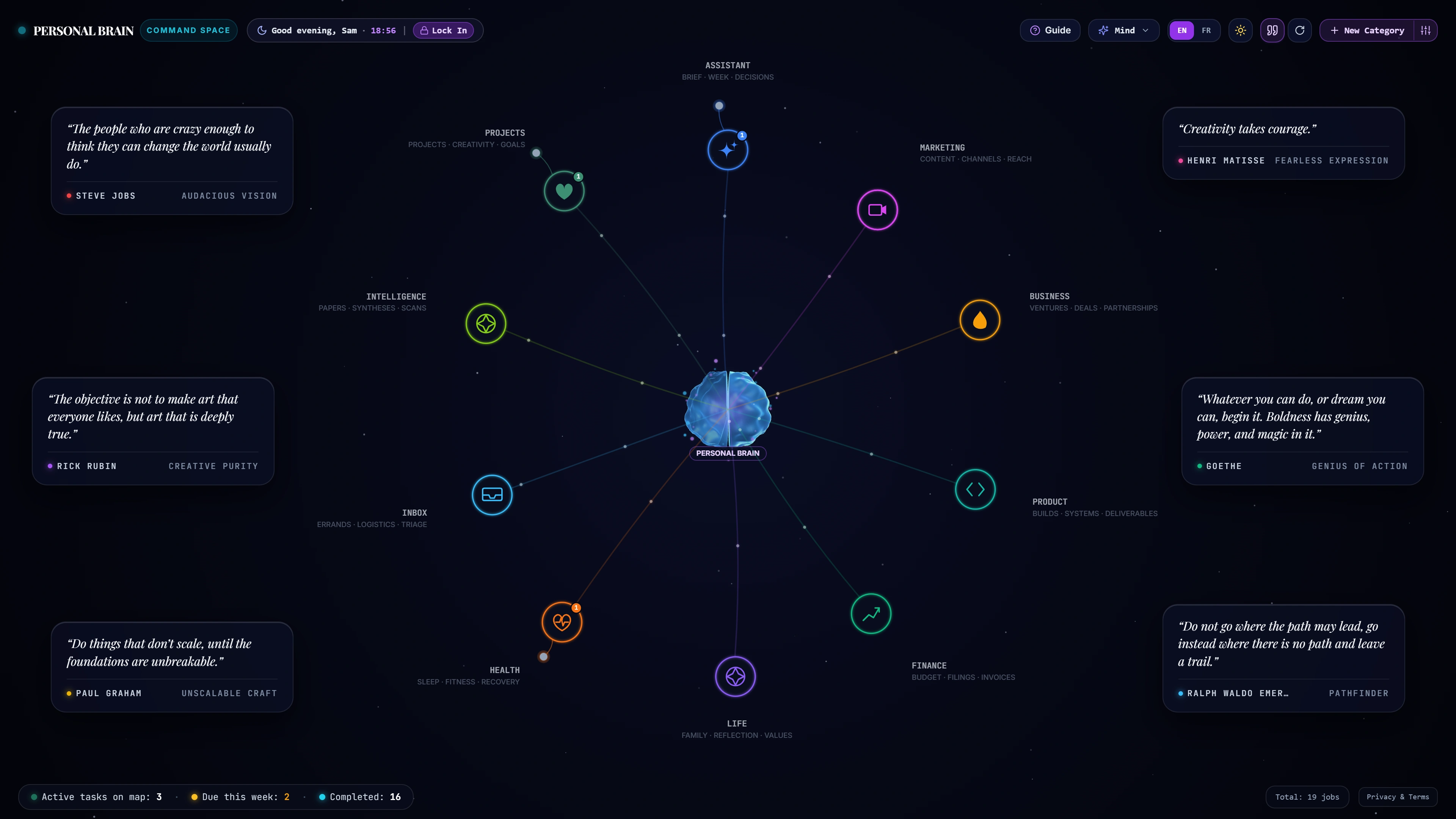
3D Neural Command Space

See all 10 life and work domains around one interactive 3D core instead of digging through nested sidebar folders.

3D Neural Command Space showing 10 orbital domains
10 Orbital Life & Work Domains 1-Click Domain Zoom
Pillar 02

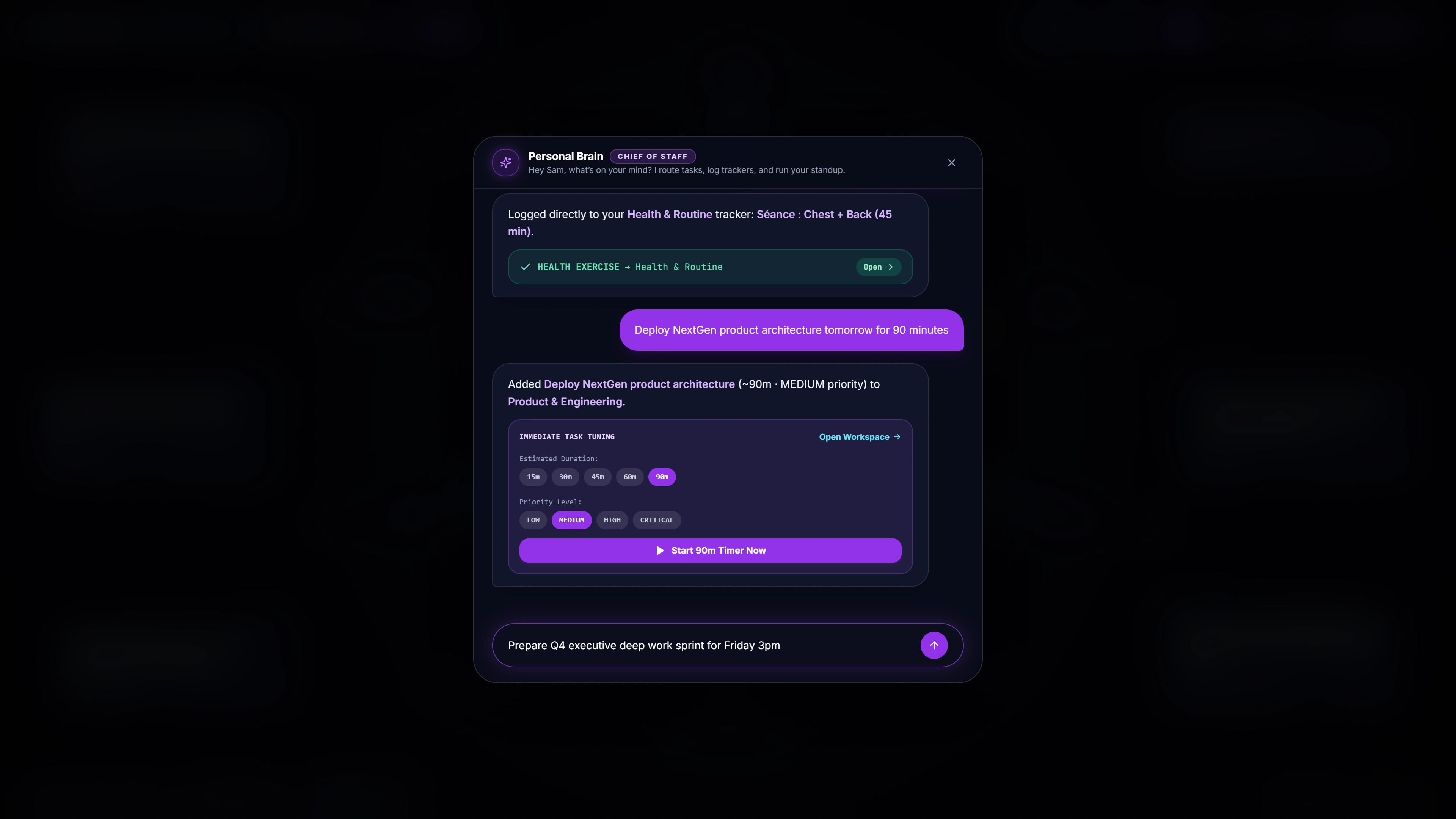
Bilingual EN / FR Command Router

Powered by a deterministic offline EN/FR parser (plus optional local Ollama support), natural sentences route straight to tasks, expenses, workouts, or study logs with zero API fees.

Bilingual EN and FR offline command router interface
Deterministic Offline EN / FR Parser Zero API Key Needed
Pillar 03

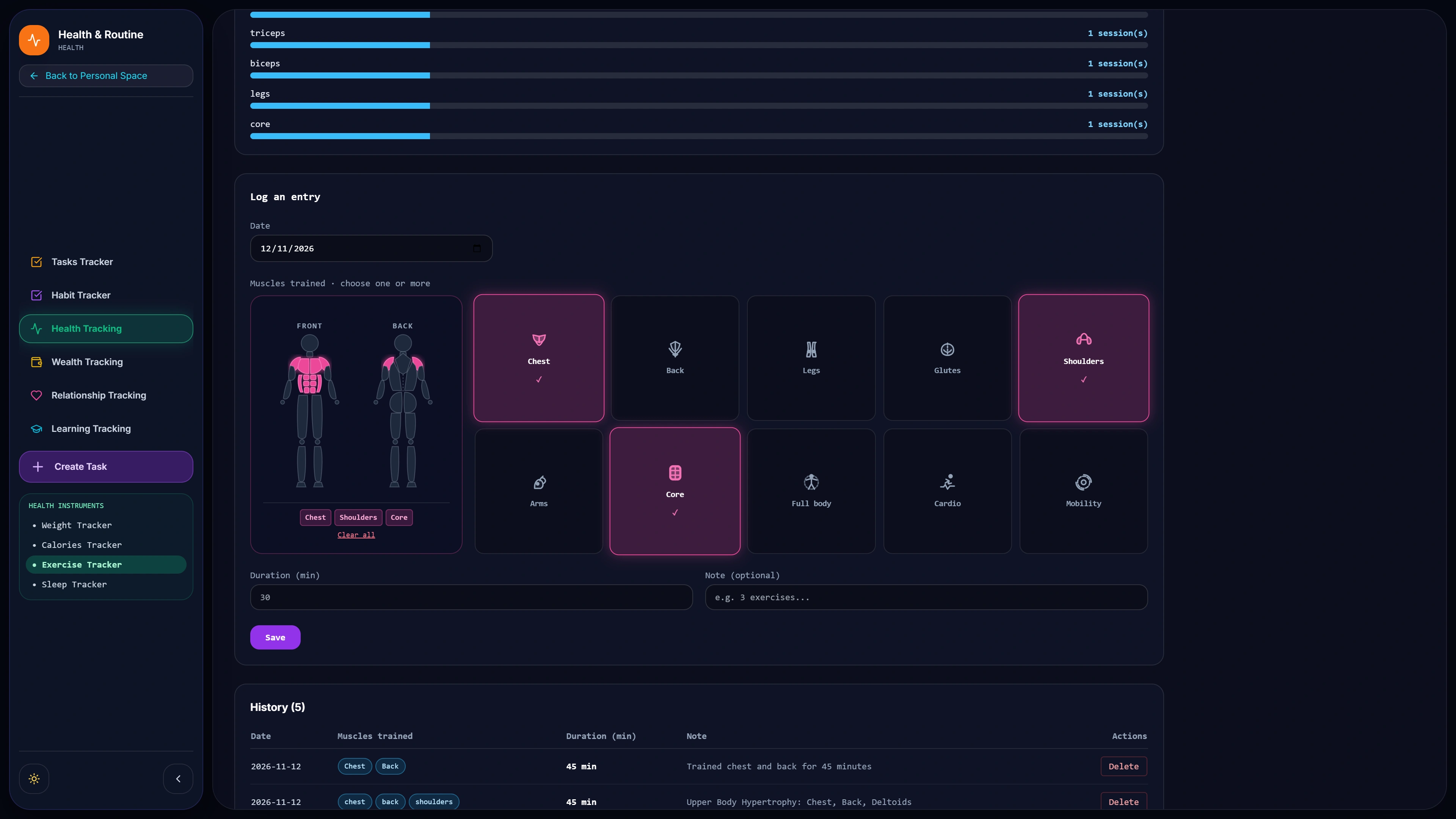
Dual-Body Anatomy Map & 6 Bento Trackers

Log anterior and posterior muscle groups directly on the Dual-Body Anatomy Map alongside daily habits, sleep, hydration, cashflow, and reading velocity.

Interactive Dual-Body Anatomy Map and 6 Bento Execution Trackers
Interactive Dual-Body Anatomy Map (Anterior & Posterior) Local Execution Suite
Pillar 04

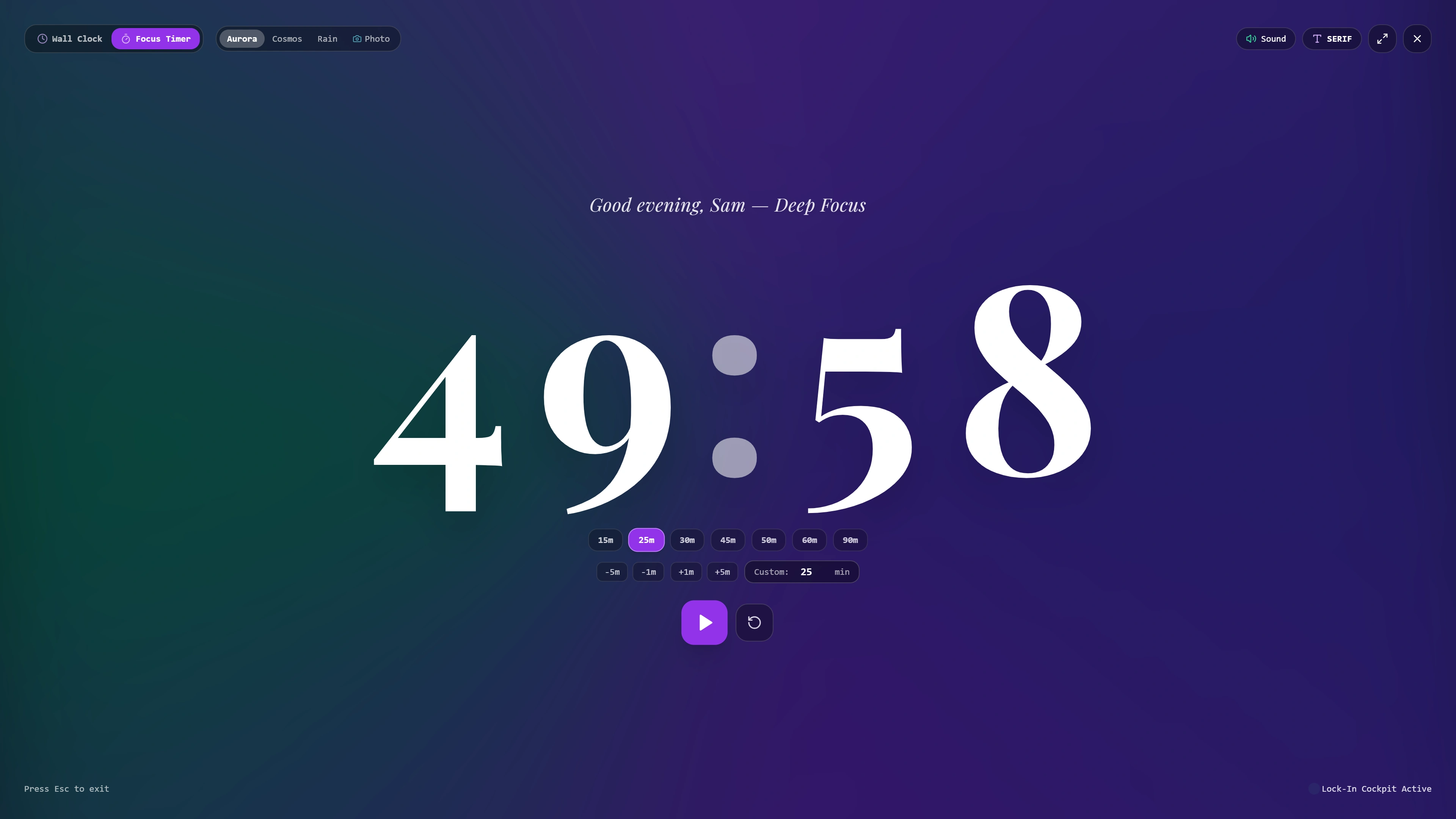
Lock-In Desk Clock

Switch into a full-screen focus cockpit with Aurora, Cosmos, or Rain canvases and gentle built-in felt-piano interval chimes.

Ambient Felt-Piano Lock-In Desk Clock in full-screen mode
Ambient Felt-Piano Lock-In Clock · Aurora Fullscreen Focus Mode
Additional Screen Captures (Click any frame to zoom) 3840×2160 Real Captures
Personal Brain OS Full Composite
Personal Brain OS Clean Neural Map
Screen 01 — Command Center
Screen 02 — Bilingual Command Router
Screen 03 — Dual-Body Anatomy Map
Screen 04 — Full-Screen Desk Clock
Ownership & Setup Clarity

What happens on your machine after checkout.

01 // LOCAL PRIVACY

100% Stored On Your PC

Notes, tasks, workouts, and financial logs live in a single local file inside your Windows AppData folder. Your entries never touch third-party servers.

Exportable 1-File JSON Backup Anytime
02 // ONE-TIME LICENSE

Pay $49 Before Dec 1

Payhip emails your license key and installer link right after payment. Lock in the $49 early launch price before the standard $79 rate begins on December 1.

Up to 3 Windows PCs · 14-Day Guarantee
03 // ONBOARDING

Showcase Mode + 1-Click Reset

Boot directly into a sample 10-domain workspace to explore every chart and shortcut first, then click "Initialize My Clean Brain" to wipe sample data in one second.

1-Click Toggle: Showcase -> Clean Brain
Note From the Builder

I built Personal Brain OS because jumping between a notes app, a habit checklist, a finance sheet, and a browser Pomodoro timer was costing me an hour of context-switching every day. I wanted one fast Windows cockpit that boots offline, talks in English or French, and never holds my personal records behind a monthly subscription. Every line of this desktop release runs locally on your own disk, backed directly by me at nexuspeakdigital@gmail.com.

Early Launch Window · Ends Dec 1

One license key. Lifetime local ownership.

Payhip Instant License Key · v1.0.1

Personal Brain OS Launch License

$49 $79 Early Launch (Ends Dec 1)
  • ✓ One-time payment ($49 now, $79 standard after December 1)
  • ✓ Windows 10/11 desktop app (install on up to 3 Windows PCs)
  • ✓ All 10 domains, 6 Bento trackers, Dual-Body Anatomy Map, EN/FR parser & Lock-In Clock
  • ✓ Includes free Mobile Companion access at release (Coming Soon)
  • ✓ 14-day no-questions-asked refund guarantee
Delivery Instant Key + Download
Activation Up to 3 Windows PCs
Refund Window 14 Days Full Refund
Unlock Personal Brain OS ($49)
Questions? Email nexuspeakdigital@gmail.com
Supported OS
Windows 10 / 11 (64-bit)
Release Binary
Setup v1.0.1 · 106.8 MB
Offline & Machines
Up to 3 PCs · Runs Offline
SmartScreen Note
Click "More info" -> "Run anyway"
Setup v1.0.1 SHA-256: 1CA539BC0F90A26DE1D7626666EB6EF8FF87BB7E0441380A2B6309A6E4455EC2
Technical & Licensing FAQ

Direct answers before checkout.

7 Key Specifications
Out of the box, Personal Brain OS uses a fast deterministic English & French command parser that runs locally inside your app with zero internet access or API keys. It extracts dates, durations, expenses, workout logs, reading pages, and task priorities in milliseconds and routes them into your workspaces. If you want conversational LLM reasoning on top, you can optionally connect a free local Ollama runtime (e.g. qwen2.5:3b) on your own PC.
Immediately after checkout via Payhip, you receive your unique license key and the Windows v1.0.1 installer link on screen and by email. Your $49 Early Launch price holds until December 1, after which the standard price becomes $79. Your key activates up to 3 Windows PCs; after initial key verification, the app runs 100% offline.
Personal Brain OS v1.0.1 runs natively on 64-bit Windows 10 and Windows 11. Because this is an indie desktop release without an EV code-signing certificate yet, Windows Defender SmartScreen may show "Windows protected your PC" on first run: click "More info" then "Run anyway", and verify the SHA-256 hash shown above against your downloaded installer.
Every task, habit, workout, expense, and note commits to an embedded SQLite database running in Write-Ahead Logging (WAL) mode inside %APPDATA%\PersonalBrainOS\data\brain.db for crash-safe local writes. The 3D Spatial Topology interface renders your 10 domains using hardware-accelerated WebGL, automatically scaling pixel density on laptops to stay responsive on integrated GPUs.
Yes. Personal Brain OS boots with a complete 10-domain Showcase Demo so you can click through the 3D orbit, Bento trackers, Dual-Body Anatomy Map, EN/FR command router, and Lock-In Desk Clock immediately. When ready, click "Initialize My Clean Brain" in the header to reset to an empty private database in one click.
All v1 updates are included with your launch key, and your license supports up to 3 Windows machines. Export your entire workspace as a portable JSON backup directly inside the header menu (or copy your brain.db file) to restore on another computer in seconds.
Every license includes a 14-day no-questions-asked refund guarantee. If Personal Brain OS is not a fit for your workflow, email nexuspeakdigital@gmail.com within 14 calendar days with your Payhip order receipt for a full refund.
Personal Brain OS
$49 $79 · Ends Dec 1
See Launch Offer